Rabbit Hop – 2D Platform Game

Rabbit hop is a 2D platform game which I created completely from scratch with my own custom artwork and music, which I feel brings the game to life. The below video shows the current stage that my game is at. I have a fully working game; complete with menu system, tutorial levels, main story levels, enemies, collectables, music and more.

I am very happy with how this project is going and I am loving developing my game and progressing with it as far as I can possibly take it. I have targeted the game at a younger audience (which I feel like I achieve by the stylised art style and easy learning curve). I used the tutorial levels, along with nifty signs (located on various levels) to help players gradually learn the game and to give them tips on how to play the best possible.

Next steps for the game:

I don’t want to stop here with the game, I want to continue developing it until I have a large 2D platform game with multiple mechanics and a large variety of levels. To achieve this I plan on adding high scores (using Unity prefs) to allow players to compete against their previous attempts. I am also considering adding in other enemies, collectables and level environments to make the game less repetitive. However, my next step is going to be creating more levels and introducing sound effects to collectables and enemies.


Low Poly World (the beginning)

For my new 3D modelling project we have been set the task of creating  low poly world (stylised). For this project I will be working with my friend and peer, Josh. For this project we have already planned how we want the low poly world to look, and we have divided the to do list between us to work as effectively as possible.

So far I have already 3D modelled and textured the main land/island which the rest of our models will be located on, to create our overall environment. We have already planned out how our low poly world is going to look so we are gradually working through all of the 3D models, we require, together to get our low poly world completed quickly and to a high standard.

Below is the low poly landscape that we are using as the basis of for this project. There is other 3D models that I have created for this project, however I will show those off in a later update post showing our progress with this project.

lowpolyislandrender.jpg

For the base of our low poly world I have created a ring of mountains, in which there will be a race track circuit for our vehicles to be displayed. We have decided that Josh would model the track and we would each model a vehicle each. There will be an update blog post on our progress shortly in the future.

Platform Game Update (Effectors)

Today in Chris’ game design class we learned about effectors and how to use them in a 2D game. The three effectors I have introduced to my game are; platform, surface and buoyancy effectors. All have different effects, but I found all of them to be useful for different reasons.

I started off simple by introducing platform effectors to my game. I did this so that it is possible to jump up through the bottom of a platform and land on the top without falling through it. I found this very useful and it is actually a feature used in my platform style games. For this effector to work, the effector needs to simply be added to the object along with a box collider (that uses effectors).

Secondly, I introduced a surface effector, to create a lift effect, on one of my levels where the player is required to wall run. Essentially, the surface effector propels the player up the wall. To use this effector, all that is required is for the direction and magnitude to be select in the sidebar. Once this is done, simply set the box collider (that uses effectors) up to the area you want the character to move in, and it’s setup.

Finally, I worked on adding buoyancy effectors to my water. so that the water object acts like water should (the player bobs up and down). I haven’t got the balance, with the parameters, perfect yet, but as I develop my game further I plan on animating the water and adding particle effects. When the time comes and I am improving the water, I will modify the buoyancy effector to get it perfect. To use the buoyancy effector the target object has to have a box collider on it along with the buoyancy effector its self. This effector has plenty of parameters which can be modified to get the perfect look for most games.

Ladder effect (platform effector)water bob (buoyancy)

Overall, I am very happy with how my game is turning out, I am looking forward to developing my game further, to get it to not only a complete game (eventually), but also a high standard.

Ball Brawler Game – Beginning

For the Ball Brawler game we will be working in a team of 6, however today we were all working on various aspects of the game. Working in duos to gather ideas of how the balls can behave and then trying to make them behaviors happen. The work in this blog post was completed by myself and Liam, with a little bit of feedback from my other team mates.

Firstly we started of by programming the ball so that it would have a force, meaning it would bounce in the air every time that the ball collided with the ground (rather than dropping “dead”). This feature is going to be present on every one of the balls to make them intractable and more fun. The ball in all of the videos featured in the blog is a standard red, just for connecting, colours will vary in the actual game.

Increase In Size

Once we had the ball bouncing we began brainstorming what we could have the ball do. The first idea that came to mind was to make the ball grow in size upon every jump. This was a simple bit of programming to add to the original force script. The ball’s scale is simply multiplied by 2 in every axis every time the ball collides with the ground. This will only happen when the ball collides with the ground and not anything else.

Bounce Increase

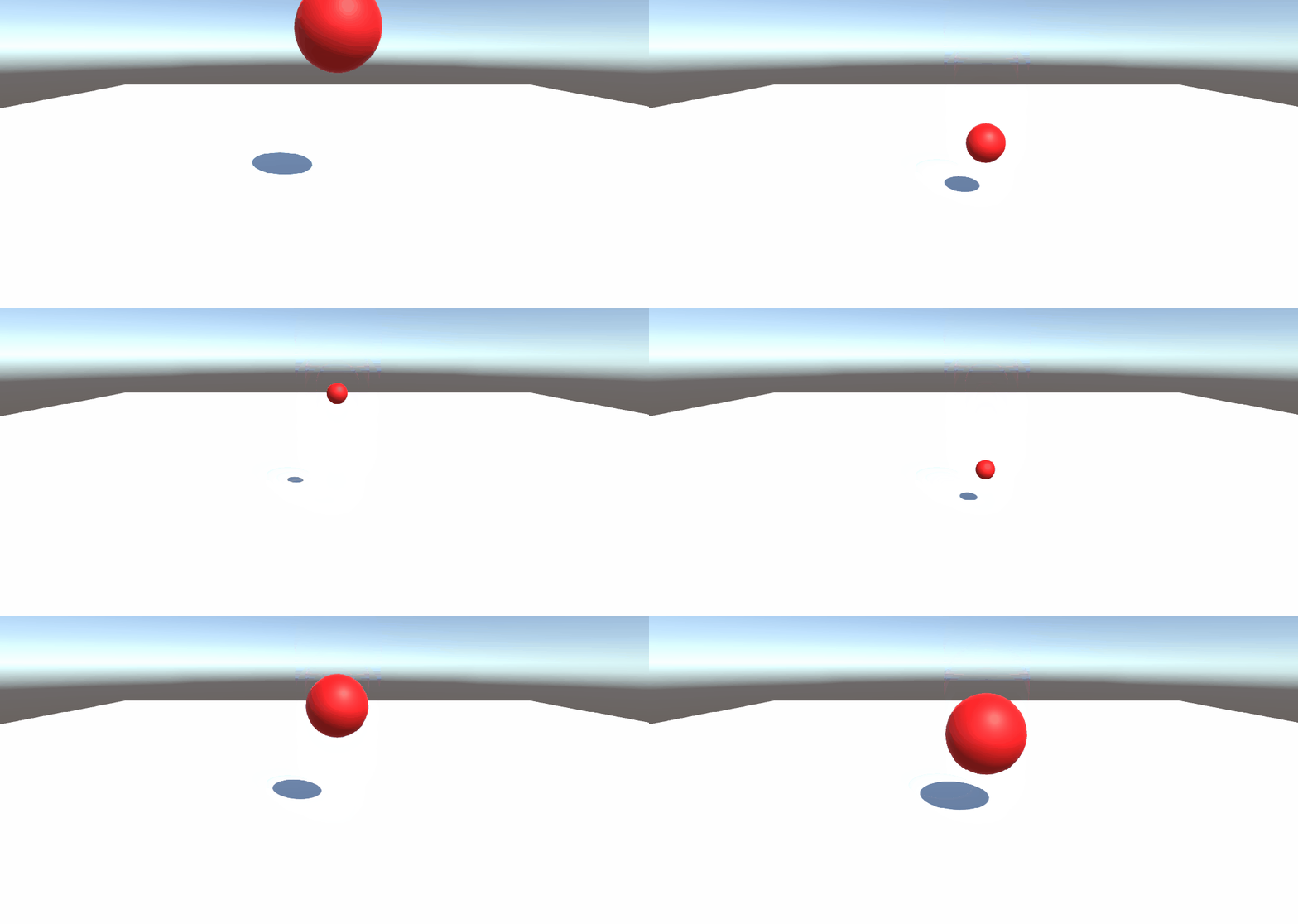
Decrease Then Increase In Size

The next step for us seemed fairly obvious, we had the ball growing in size so why not make it decrease in size. However, we realized that a lot of people would likely go with this alternative so I decided to program the ball so that it gets smaller every time it collides with the ground, just like the ball that gets larger. But the difference is that once the ball gets to a scale of 0 it becomes larger upon every bounce. This is clearly demonstrated in the video below.

Bounce Decrease

“Jump Pad”

The final idea which I had was to develop a jump pad which could cause the ball to bounce two times as high as the regular ground causes it to bounce. I feel like by adding these to an arena randomly placed, on angels, would cause more of a variety in the way the balls interact. I also personally think that this will make the game more fun to play as it will feel more interactive because more will be happening. If the game is developed enough, we could even consider allowing the players to change the way the platforms are positioned (this is up for debate).

Bounce Pad

Overall

To conclude, I am very happy with the progress we have made so far and we are looking forward to seeing what we are able to do with this game. I think it is easy to say that my entire team is curious as to how the game will develop and what direction we will take it.

Team’s Blog Links

Game Jam – “Escape” (1hour 30mins challenge)

On Friday, unfortunately Chris was off so we were set no specific work, therefore my group of friends decided to have a friendly game jam competition. The theme was chosen at random and was ‘Escape’. The team’s were; myself, Nathan and Liam vs Luke, Josh and Matty. We had 1hour 30mins to come up with the working game concept.

Personally I feel like both teams did very well for the time we had, and I personally think that we all proved that we can work effectively, not only as a team, but also creatively. As well as this I know that my team also showed that we can turn our ideas from ink on a piece of paper to on the computer screen.

Below is an image of my teams ‘scribbles’ for when we were thinking of ideas. Excuse the mess of the page, however, it did prove effective as it is very similar to the final result showing in the short gif below.

28461940_889972531173964_732929151_o

Quick

In the group we divides ourselves between game design, programming and art. Liam focused on art, making the game blocks and goal for the game (experimenting with different styles, trying to match the idea we came up with). Whereas, myself and Nathan focuses on game design and programming, myself mainly working on programming, and Nathan mainly working on game design, but both of us collaborating to be as effective as possible – helping each other out with different things we were trying to achieve.

The concept of the game is to control a glowing green ball and to navigate round a black abyss, avoiding black objects (only highlighted by glowing red light). Upon contact with anything glowing red, the level will restart. To make it to the next level the player has to make it to the portal which transports them to another abyss which they have to navigate. We didn’t get any further than this as we spent a lot of time getting the player controller and camera follow working, as well as the visual effects (glowing effects and motion blur).

Obviously there is many changes we can make to improve the game, such as sound effects, keys, etc. However, I am very happy with how the game turned out for the amount of time we had to work with. I’d just like to say well done to not only my team (Nathan and Liam), but also to the other team (Luke, Josh and Matty), as I feel like both our games turned out quite well, and I am proud of both teams attempts.

Final note: apologises for delayed posting, my current situation (room being redecorated) has caused my routine to be slightly effected. My routine will be back to normal soon.

2D Platform Game Update – Power Ups + End Scene

In todays lesson I have over come some mechanics which have caused me some annoying issues . The first mechanic I introduced to my game today was the power up. I created a speed power up icon in my art lesson yesterday which I then added script to today. I didn’t really having any issue making the power up effect the players speed, however making the player return to its original speed after a set amount of time, was more difficult as the power up is destroyed when “collected”. I over came this issue, and got the power up time limit working, by using and invoke function which then triggers a reset speed function which references the player controller and resets the player speed.

The second issue I over came today was a much simpler one which was mainly down to a simple error. I created a game over screen, in which the player can still move around for 30 seconds, until the timer reaches 0 and the game restarts (main menu loads).

Overall, I am very happy with how my game is going, I feel like I am making very good progress with my game and I have many ideas for continuing to improve it. I am looking forward to getting the game more fleshed out and adding more elements into the game. Some ideas I am considering are; more collectables, more enemies, more power ups, hidden levels, and more. I have included a short video below highlighting the power up and game over level which I have included in my game.

game update

2D Platform Feedback

Today Nathan, Matty, Luke and myself spent time critiquing each others 2D platform games and giving them feedback so that we can all improve are games and make them the best we possibly could. By doing this it has brought some issues to my attention, as well given me ideas on how I could potentially change and improve my game.

Feedback:

Nathan

(POSITIVE) Mechanics feel good and clean with a fresh polished look to the style.

(NEGATIVE) Moving blocks feel hard to keep up with ( you have to run whilst the block is moving).


Matty

(POSITIVE) I really like the overall feel of the game. It already feels like a highly developed game like Super Meat Boy. I am looking forward to what this game comes to in the future.

(NEGATIVE) One negative that I have, although very minor, is the fact that I can climb up the wall and jump out of the level. Very little negative things I can say about this game.


Luke

(POSITIVE) Game runs really smoothly and everything looks clean from the character to the assets to the particle effects.

(NEGATIVE) I think one of the only things missing from this game is something that is teased when the tutorial ends and that is a high score feature which I know you were planning on adding anyway.
Key:

Issue has been addressed.


I addressed the issue that Matty brought to my attention by adjusting the bordering box colliders, and setting them so that ground check is false.


Call of Duty – WW2 (Game Design Flaws)

Upon recently playing Call of Duty WW2’s latest game mode, demolition, I have immediately noticed some flaws within the design of the game. Activision may have only made a few changes with the return of demolition in Call of Duty WW2, however, the subtle changes they have introduced may not be so subtle.

The main change that Activision have introduced to demolition is the longer defuse time, which is now 7.5 seconds rather than the 5 seconds which has been featured in every other Call of Duty. This may only seem like a short period of time, however, when the bomb timer is only 45 seconds long and players are expected to combat a 6 man team and defuse a bomb within 45 seconds it becomes a much harder task.

Another change that Activision has introduced is that the bomb can only be defused from the exact position that the bomb was planted at. Much more realistic than in other Call of Duties, where the player could plant the bomb on one side, and it could be defused from the other side, some times the moment after the bomb was planted (without the bomb planter even being aware). However, this may be more realistic but it makes defusing the bomb so much harder, despite the skill level of the player. This is because Activision has also made it so that the spawns don’t flip, for those of you who have never played the Call of Duty series – this means that where the player spawns on death remains within the same radius throughout the entire game (despite the position of the enemy players). With this combination of changes to the legendary game mode, it has meant that even the best players are struggling to get the easy wins they normally would in other game modes, as the demolition is now simply down to who can plant the bomb first because defusing it is an almost impossible task.

From my own experience, after play 15 games of demolition, over the last two days  (solo – without any friends on my team) , I have found that winning games is more down to luck than any kind of real skill. Over the last 15 games I managed to win 9 games, lose 6. This may seem to be a fairly good win/lose record, however as I am ranked in the top 500 players in the world I would normally be expecting to win around 12 or 13 out of the 15 games at least. On the other hand, game modes such as hard point and team death match are game modes which are more skill based (where luck doesn’t take effect).

Personally, from my prior experiences playing demolition I have found that the game mode plays completely different to what it has done in prior Call of Duties. The objective of the game mode is for a team of 6 players to plant 2 bombs and to have them blow up to win the round versus another team of 6 players to defend them 2 bombs to win the round. After this halves swap and the teams do the opposite to what they have just been doing (e.g. team who was previously defending now attacks). Each round has the potential to last 5 minutes each and then 5 minutes for the overtime round if the game is a draw after two halves, totalling potential 15 minute games, longer than game modes such as team death match and domination which only last a maximum of 10 minutes. However, after playing this game mode I found that games were often only lasting the maximum of 5 minutes (including the overtime round) because of the “flaws” I feel like this game mode has.

To conclude, I personally think that Activision should revert back to how demolition has been done in pervious Call of Duties, as in my opinion Call of Duty WW2’s predecessors have been able to make demolition fun to play, so I don’t see why demolition should be ruined by Activision.

2D Platform Game Full Game Progress

Overview

This blog post will cover an in-depth look at my progress with “Rabbit Hop”, my 2D platform game, and all the steps I have taken to get to the stage I am currently at. As well as this I will also be talking about my future plans for this game (both long and short term) as I plan to push this game to its limits and achieve the best quality game that my abilities will allow me.


Game Play Video

Below is a video showing different features and Mechanics, I have included it as it demonstrates many of the subjects I will be mentioning in this blog post.

One feature which isn’t shown in my video, which I accidental dismissed, is the pause menu which I have created. I will make a blog post soon showing how the pause menu works and as people have been asking me how I have been doing it I may do a simple tutorial which people can follow, if they are interested.


Basic movement / Character Animation

The basic movement of my character is fairly simple, the character is scripted to face the way the player wants to face, by flipping the character in the X axis. The character has a fully working animation system (all made from scratch out of pixel art). Below is the only pixel art images that I required to make my character animate.

  • All four for the run.
  • The first one for the idle.
  • The second one for the jump.


RabbitWalkingAnimation

A fair few people actually asked me for advice on how to set up simple character animations like this, as the method we were told to do didn’t work for many people. There is a tutorial on how to do this on my blog post about character animation.


Moving Clouds

For the moving clouds it was actually fairly simply yet very effective in my opinion. I started by creating a nice sky blue background, and setting it as the back layer. I then created a cloud, on Adobe Photoshop, which I placed on the layer above and added a simple movement script to (with public speed and range variables). By having these variables I am able to create variety other than just the size of the clouds. Finally, I created a spawner script which would spawn the the prefabs clouds. I altered some speeds and rate of spawn on the clouds until I got a look I was happy with. The short clip below simply shows how I have implemented this cloud effect throughout my levels and even the main menu. Personally, I feel like it makes the game have more personality and I am very happy with the look it gives me.

Platform Game GIF

Collectables (Carrots)

To add a more fun dynamic to my game I decided that I would add a score system so players have a goal to aim for and to beat. I was originally going to go with traditional coins, as I love traditional 2D platform games, however carrots made more sense with the style of the game, and the character choice. Each carrot the player collect will gain them 100 points which is displayed at the top of the screen. For the collectable I made a simple carrot sprite in Adobe Photoshop which I feel is effective as it easily stands out.

Main Menu

Personally, I feel like the main menu of a game is very important as it is not only the first thing the player ever sees once the game has loaded, but it is also how the player navigates between all the key scenes of the game (for example; starts levels, changes their settings, etc.). In my opinion my menu is fairly simple and could be improved, however it is fully functional, simple to navigate and most of all, fairly nice to look at (with the pleasant blue background with moving clouds). The small clip above highlighting the moving clouds also shows off the games main menu so I won’t bother repeating another short clip.

Enemies

As of current there is only one enemy in the game which is featured in the game on level 2. However, more enemies will be getting introduced as the levels progress. Never mind that though because I am actually very proud with the achievement I have achieved personally when making the enemy in my game. I have set up the enemy so that if it hits the player direct on it will kill the player, however if you jump on the enemies head it will kill the enemy, product a particle effect and will eventually reward the player either with score or score and a power up. Below is the enemy currently in my game.

Enemy2

Particle Effects

As of current my game only has three particle effects in it, but I will be introducing many more as my game progresses, to “juice” it up more. The main particle effect in my game is the carrot particle effect which is triggered when the player collects any carrot in the game. I created this effect to give the player feedback (other than +100 score) when the player collects a carrot. Personally, I am happy with how this particle effect benefits the game, but I do want to improve this effect, possibly with the help of Gary.

Other particle effects which I use are for the lava and for when a player kills and enemy. I created the lava particle effect to make the game more lively and interactive, as well as hinting to the player that the lava is likely dangerous. To add to this I plan on animating the lava with a simple, subtle animation to make the game more interactive. Finally, the last particle effect which I current have in my game is a very basic particle effect which is triggered when a player kills and enemy, this is done in order to give the player some feedback so that they are aware that they killed the enemy and that it is a positive thing.

Game Future Plans

  • Improve main menu
  • Add more enemies
  • Add health (hearts)
  • Add power ups
  • Add more particle effects (when running/finishing level)
  • Add sound effects (killing enemy, dying, completing level, collecting items)

Game Background / Dedication

This game is a compilation of many ideas, I have had for a long while now, which have came together quite nicely (in my opinion). I have always enjoyed 2D platform games and have actually made a 2.5D game (Acclimatised) before making this game. I did enjoy making Acclimatised, and Josh, Liam and I do plan on working on it more in the future (when we have more free time). However, I have far more enjoy making “Rabbit Hop” as it is a game I have had the ideas of making for a while, but haven’t known how to make until recently. I am completely enjoying my experiences making it and I find myself learning more and more new skills and tricks. “Rabbit Hop” is actually dedicated to my girlfriend Charlotte as we came up with the rough idea of the game together and I have begun creating it. Once the backstory / dialog of the game begins to be added it will start to elude to this and the main character will also be name Charlotte.


2D Platform Game – Particle Effect

To improve the overall ascetic of my game, I have been experimenting with particle effects, to add a bit more depth to the game. I feel like the extra particle effects make the game more enjoyable as the game feels more alive. The particle effects that are currently in my game are fairly simple, but I feel effective. They are lava particle effects coming from the lava in level 2 and the carrot effect triggered every time the player collects a carrot.

Below is a screenshot of the lava particle effect I have used in level 2 of my game. I am very happy with how it has turned out and I personally feel that the effect it has is beneficial as it makes the game seem more intractable and less “flat”. Unfortunately, I don’t have an image or video of my carrot particle effect as my Mac is currently having trouble with ‘Screen to GIF’, therefore capturing a clip of this particle effect is impossible as it is only triggered when a carrot is picked up compared to the lava effect which is on going and easy to get a screenshot of.

Screen Shot 2018-02-03 at 15.13.33.png

I will have short videos of both animations as soon as I get my screen recorder working. Overall, I am very happy with how both particle effects have turned out. I still wanted to do a bit of tinkering around with each of them to get them the best I can possibly make them. One thing that I am very happy with about my progress during this process is that I was able to script the particle effects in, from scratch, with a little bit of a nudge in the correct direction from Chris.